Controlling a Vocal Tract With a Neural Network
TL;DR
- Goal. Teach a neural network to control a simulated vocal tract.
- Why. Curiosity, and speed: predicting slowly changing controls is cheaper than generating every audio sample with a network, and the simulation is cheap to run.
- Setup. The tract makes only the sound above 6 kHz. To keep this post simple, the rest comes from the original recording.
- Trick. The tract is linear, so each sample of the sound entering it can be simulated separately, all in parallel. Training then goes through about a hundred simulation steps in a row instead of tens of thousands.
- Result. The reconstructions sound less muffled, and consonants get their sharpness back.
Introduction
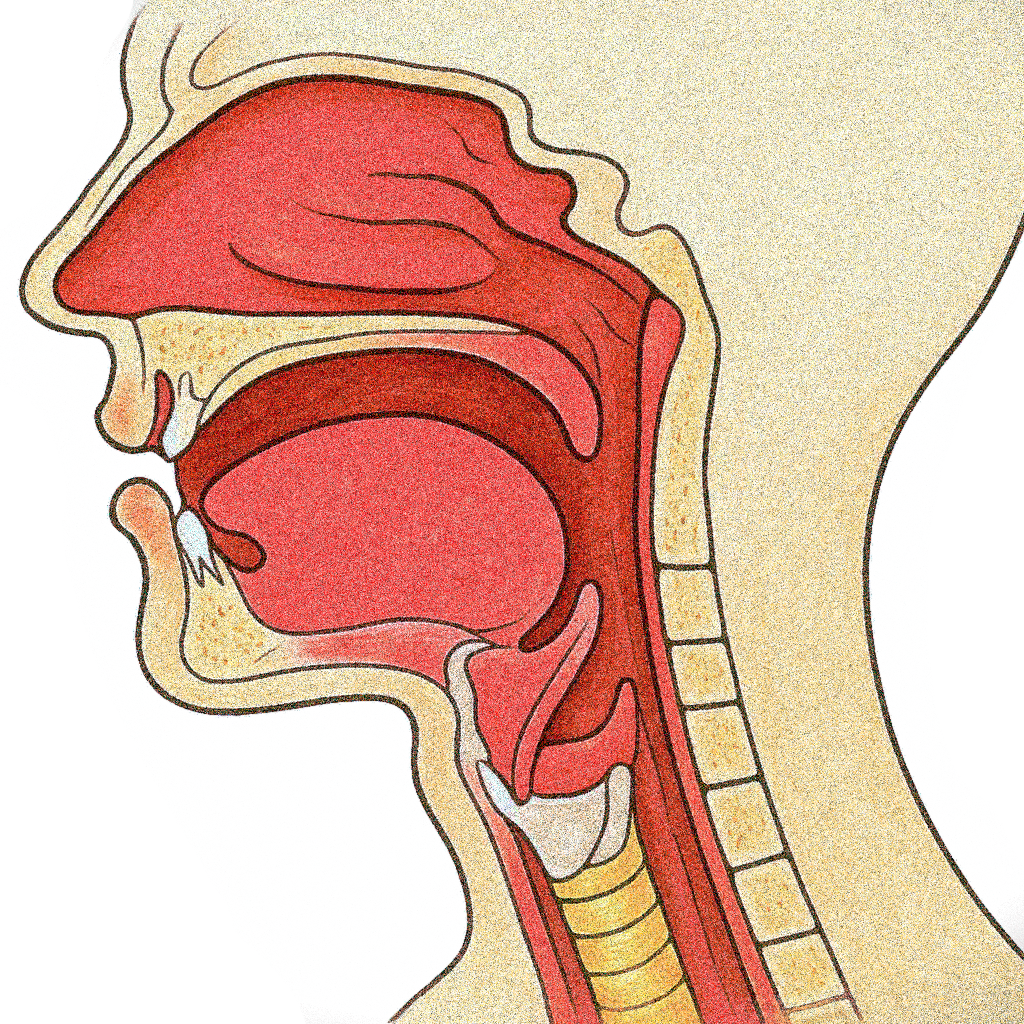
There is a site called Pink Trombone, a browser-based vocal tract simulation where you can drag around control points with your mouse and hear bizarrely lifelike vocal sounds. There’s no text, no phonemes. Just a simple simulation of sound traveling through a deformable tube that resembles the human vocal tract. As you drag the glottis slider or reshape the oral cavity, the sound changes. And if you’re patient and precise, you can get it to say vowel-like sounds, or even whole syllables.
This simulator inspired a research question: could we train a neural network to control this simulated vocal tract and make it produce speech? Instead of a person dragging sliders, a network would decide the shape of the tube at every moment, and the simulation would turn those shapes into sound. This could also be cheap. A network that generates audio directly, as most neural speech synthesizers do, has to produce tens of thousands of samples for every second of sound. A network controlling the tube only has to update its shape every few milliseconds, since the shape changes slowly, like the muscles of a real mouth, and the fast simulation produces all the samples in between.
Simulating the Vocal Tract
Sound is a tiny pressure wave traveling through air. When we speak, air from the lungs passes the vocal folds, which either vibrate and chop it into pulses, as in vowels, or let it through to hiss at a narrow gap near the teeth, as in “s”. The sound then travels through the throat and mouth, a tube whose shape boosts some frequencies and damps others. Change the shape, and the sound changes.
To simulate this, we don’t need to model muscles or air molecules. We only need to compute how the sound wave moves through a tube of a given shape. A computer does this in small time steps, like the frames of a movie. At each step, it takes where the sound is now and computes where it will be a moment later. One of the simplest ways to do this, and the one Pink Trombone uses, is called a digital waveguide.
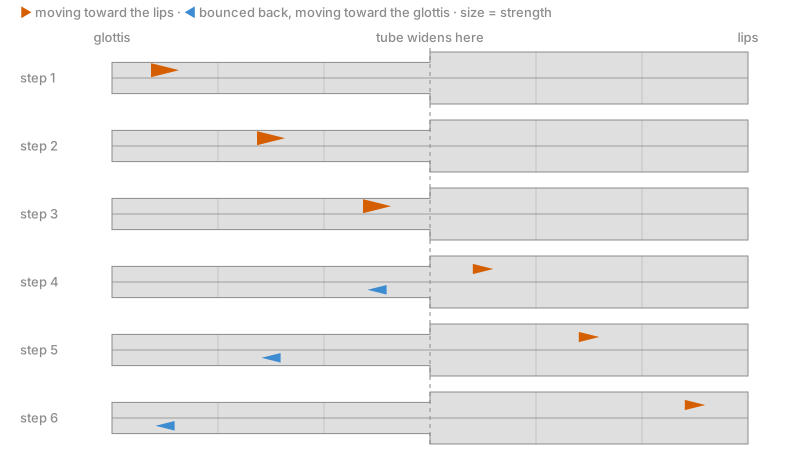
We cut the tube, which runs from the glottis (the opening between the vocal folds) to the lips, into short segments, each with its own diameter. Changing these diameters is how the simulation mimics the tongue, jaw, and lips reshaping the vocal tract. In each segment, some sound moves toward the lips and some moves back, so we keep two arrays of numbers, one for each direction. At every time step, each value moves one segment further in its direction.
Where the diameter changes, part of the wave bounces back. At the junction between segments \(i\) and \(i+1\), with cross-sectional areas \(A_i\) and \(A_{i+1}\), the reflection coefficient
\[ r_i = \frac{A_i - A_{i+1}}{A_i + A_{i+1}} \tag{1}\]
sets how much of the wave bounces back. With equal areas, \(r_i = 0\) and the wave passes straight through. If the next segment is almost closed, \(r_i\) approaches 1 and nearly all of the wave bounces back. At the glottis and the lips, the tube ends and only part of the wave bounces back into it, so the sound inside slowly dies out.
Figure 1 follows a single pulse through a short tube.
That’s the whole model, and the code is just as short. One time step looks like this:
import numpy as np

def step(right, left, r, r_glottis, r_lips, x):
    """Advance the waveguide by one time step. x is the sound entering at the glottis."""
    w = r * (right[:-1] - left[1:])         # what changes at each junction
    new_right, new_left = np.empty_like(right), np.empty_like(left)
    new_right[1:] = right[:-1] + w          # waves moving toward the lips
    new_left[:-1] = left[1:] + w            # waves moving toward the glottis
    new_right[0] = x + r_glottis * left[0]  # glottis end
    new_left[-1] = r_lips * right[-1]       # lip end
    return new_right, new_left, right[-1]   # the sound reaching the lips

diameter = np.ones(40)                      # one diameter per segment
area = diameter ** 2                        # up to a constant, which cancels in r
r = (area[:-1] - area[1:]) / (area[:-1] + area[1:])
right, left = np.zeros(40), np.zeros(40)
output = []
for x in np.random.randn(1000):             # white noise in
    right, left, y = step(right, left, r, 0.75, -0.85, x)
    output.append(y)                        # sound out
Each new value is the wave that would have passed straight through, plus a correction w proportional to the reflection coefficient.
Despite its simplicity, this is a physical model. For sound traveling through a chain of short, uniform tubes, the two arrays follow the wave equation exactly. Jack Mullen’s PhD thesis, Physical Modelling of the Vocal Tract with the 2D Digital Waveguide Mesh, derives it in full. It’s also cheap to run, since one step updates only about a hundred numbers.
Our tube has 40 segments. Since sound crosses exactly one segment per step, the step rate sets the segment length. At the audio sampling rate of 44.1 kHz, a segment would be 7.8 mm long and the tube 31 cm, about twice a real vocal tract. So we take two simulation steps per audio sample and add their two outputs into one audio sample, which makes each segment 3.9 mm and the tube about 16 cm, close to an adult’s. The neural network will control the tube by predicting a diameter for every segment, and the reflection coefficients follow from Equation 1.
Controlling the Tube
The Sound Source
Before the network can shape anything, the tube needs a sound to shape. In a person, that sound comes from the vocal folds, and generating it would need a model of them, either a glottal simulation or another neural network. To keep this post simple and focus on the tube, we skip that model and take a shortcut that no practical system could: part of the sound comes straight from the original recording. We split the spectrum at 6 kHz, take the band below it from the recording, and let the tube make only the band above. In a full text-to-speech system, another model would generate this lower band from text.
The split works because vowels have most of their energy below 6 kHz, while hissing consonants such as “s” and “sh” carry much of theirs above it, as the shaded consonants in Figure 2 show. That hiss is noise, so we drive the tube with white noise, high-pass filtered at 6 kHz. This is a simplification too: all of the noise enters at the glottis end of the tube, while in a real “s”, the hiss starts near the teeth.
Predicting the Tract Controls
What’s left is the job a person does in Pink Trombone, choosing the shape of the tube at every moment. Here, a neural network does it.
To know what sound to aim for, the network looks at a spectrogram of the recording, a picture like Figure 2. This is another shortcut: in a full text-to-speech system, the spectrogram would be predicted from text. For each column of that picture, about every 6 milliseconds, the network sets the 40 diameters and how loud the noise entering the tube is.
Between two columns, the tube takes about 500 steps, so the network does far less work than the simulation. Figure 3 shows how the pieces fit together.

In code, the whole forward pass, simplified, looks like this:
spec = mel_spectrogram(audio)                    # (80, columns), one column about every 6 ms
diameters, noise_level = net(spec)               # (40, columns), (1, columns)
r = reflection_coefficients(diameters)           # Equation 1
noise = highpass_6khz(np.random.randn(len(audio))) * upsample(noise_level)
upper = waveguide(noise, upsample(r))            # the band above 6 kHz
reconstruction = a * upper + b * lowpass_6khz(audio)   # a, b: learned weights
upsample spreads each column’s controls over the simulation steps in between. The spectrogram has 80 frequency bands, a format called a mel spectrogram, and the network is a 1D convolutional network with a U-Net-like structure.
Training Through the Simulation
Training Loss
Every step from the controls to the audio is differentiable, so the network can learn from a loss on the reconstruction, with the gradients flowing back through the waveguide. The loss compares the reconstruction with the original in two ways and adds a smoothness term for the tract shape:
\[ \mathcal{L} = \text{MSE}\left(\log S_{\text{orig}}, \log S_{\text{gen}}\right) + \lambda_1 \cdot \text{L1}\left(a_{\text{orig}}, a_{\text{gen}}\right) + \lambda_2 \cdot \operatorname{mean}\left|d_{i+1} - d_i\right| \tag{2}\]
Here, \(S_{\text{orig}}\) and \(S_{\text{gen}}\) are the power spectrograms of the original and generated audio, computed with a short 128-sample window, \(a_{\text{orig}}\) and \(a_{\text{gen}}\) are the raw waveforms, and \(d_i\) is the diameter of segment \(i\). The logarithm keeps the quiet high frequencies from being drowned out by the loud low ones, and the L1 term compares the waveforms sample by sample. The last term discourages jagged tract shapes by penalizing differences between neighboring segments, but not changes over time, which will matter when we look at the predicted shapes.
Parallelizing the Digital Waveguide
To train the network, the error has to flow back from the loss through the waveguide to the controls in Figure 3. That is where the simulation becomes a problem: like an autoregressive model, it produces the sound one sample at a time. A second of audio takes tens of thousands of steps, and backpropagation has to go back through every one of them.
The way out is that the tube is linear. In the simulation, every new value is a weighted sum of the old values and the input, and the weights depend only on the tube’s shape, not on the sound. On its own, each input sample comes out at the lips as a short, fading echo, and the output for a whole sound is just these echoes added up. So we give every input sample its own copy of the tube, run all copies at once, and add up their echoes. Figure 4 puts the two versions side by side on a toy tube. Both give the same output, but the one tube needs a step for every input sample, while the copies only need as many steps as one echo lasts.
A copy whose sample enters at time \(t\) uses, at its \(k\)-th step, the shape of time \(t+k\), so it sees the tube exactly as one long simulation would. In code, this takes a few lines, where x holds one input sample per simulation step and r holds one column of reflection coefficients for every step of the output:
n = len(x)                              # x: the input samples
right = np.zeros((40, n))               # one column per copy of the tube
left = np.zeros((40, n))
output = np.zeros(n + 100)
for k in range(100):
    x_k = x if k == 0 else 0.0          # each copy gets its own sample once
    # copy t uses the shape of time t + k, and its sound lands at time t + k
    right, left, y = step(right, left, r[:, k : k + n], 0.75, -0.85, x_k)
    output[k : k + n] += y
We stop each copy after 100 steps, about 1.1 ms. This is a rough, hand-picked number: if the sound loses about 3% of its energy at each step, only \(0.97^{100} \approx 5\%\) is left after 100 steps, too quiet to matter. So backpropagation walks a chain of 100 steps instead of tens of thousands, and that length depends only on how long an echo lasts, not on the length of the clip. Each step updates every copy at once. In a quick PyTorch benchmark on a GTX 1080 Ti, a forward and backward pass through the simulation for one 0.74 s training clip takes about 30 seconds sequentially, but only 0.18 seconds in parallel. For the 40,000 training iterations of four clips each, that is at least two weeks for the simulation alone, against about eight hours. The price is memory: in parallel, the simulation needs about 1 GB per clip instead of 0.1 GB, since it keeps a tube for every input sample instead of just one. Both ideas are needed: without the 100-step cut, each copy would have to run to the end of the clip, which brings back the tens of thousands of steps in a row and would take hundreds of gigabytes.
Results
We trained the model on the EARS dataset, about 100 hours of clean, echo-free speech from 107 speakers, resampled from 48 kHz to 44.1 kHz. The first 70 percent of the files were used for training and the rest held out. Since EARS keeps each speaker in a separate folder, the held-out files come mostly from speakers the model never heard. Training ran for 40,000 iterations on segments of 32,768 samples (0.74 s), with an effective batch of four.
To hear what the waveguide adds, we compare three versions of each recording:
- The original, sampled at 44.1 kHz.
- The 0–6 kHz band alone.
- The reconstruction, in which the waveguide adds the band above 6 kHz to the 0–6 kHz band.
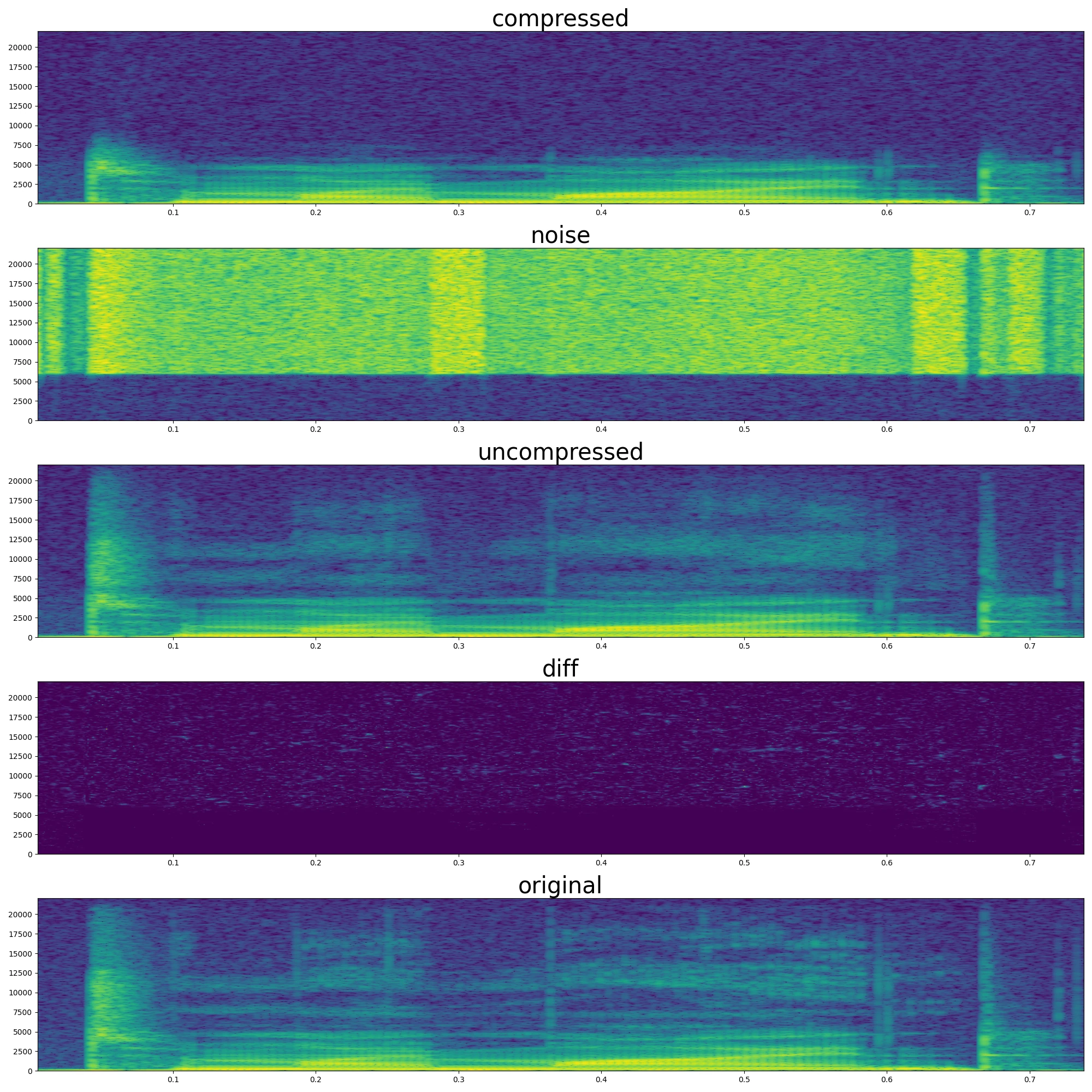
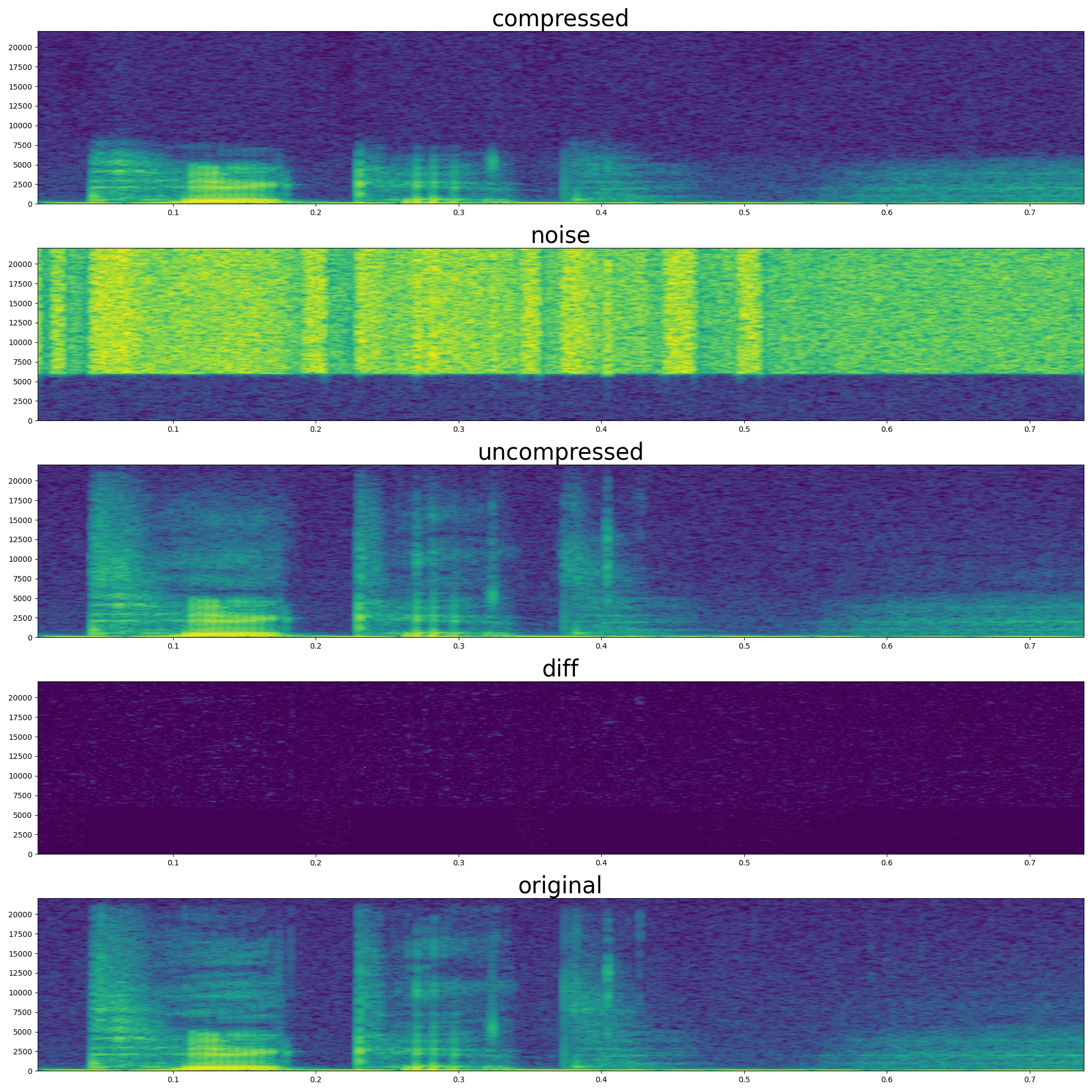
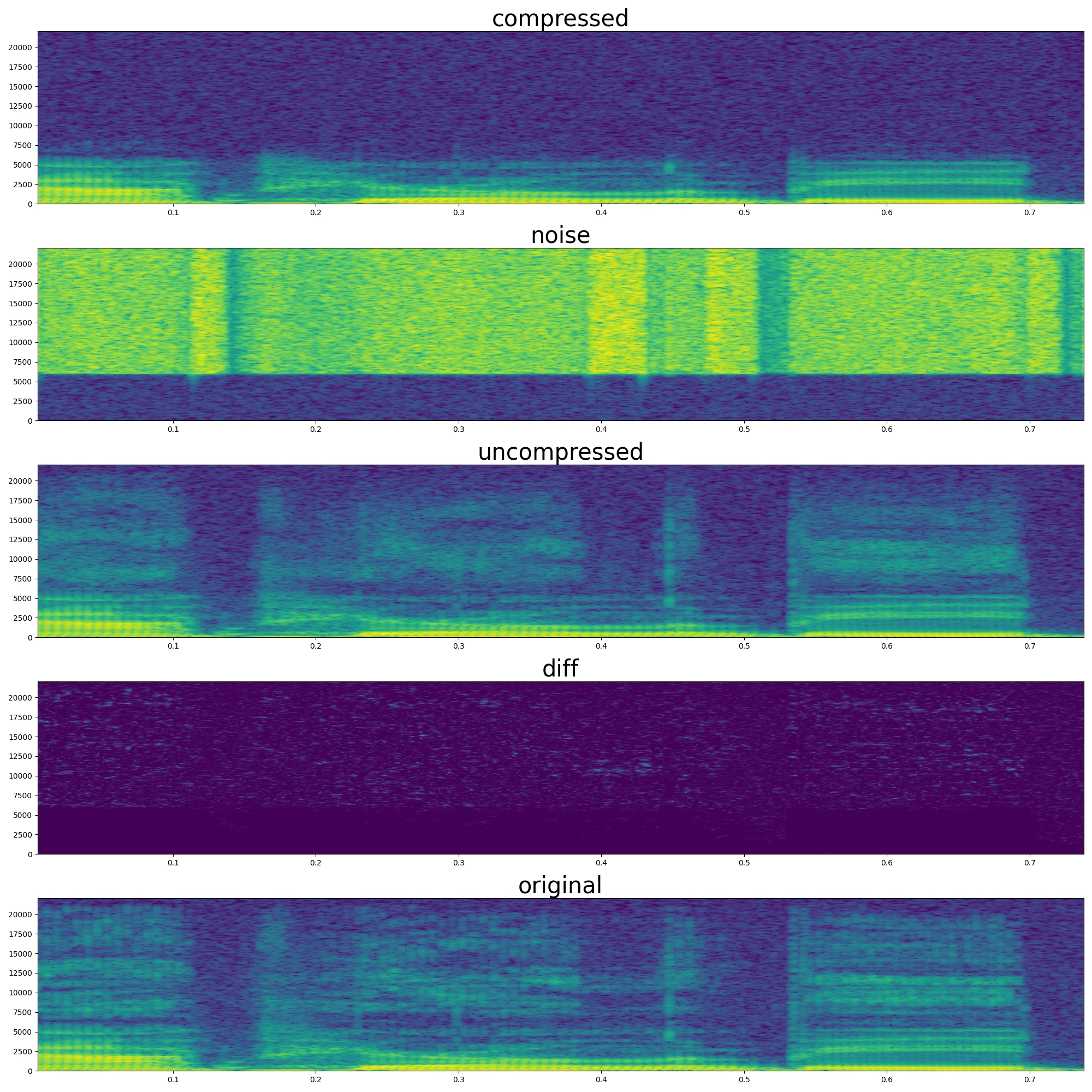
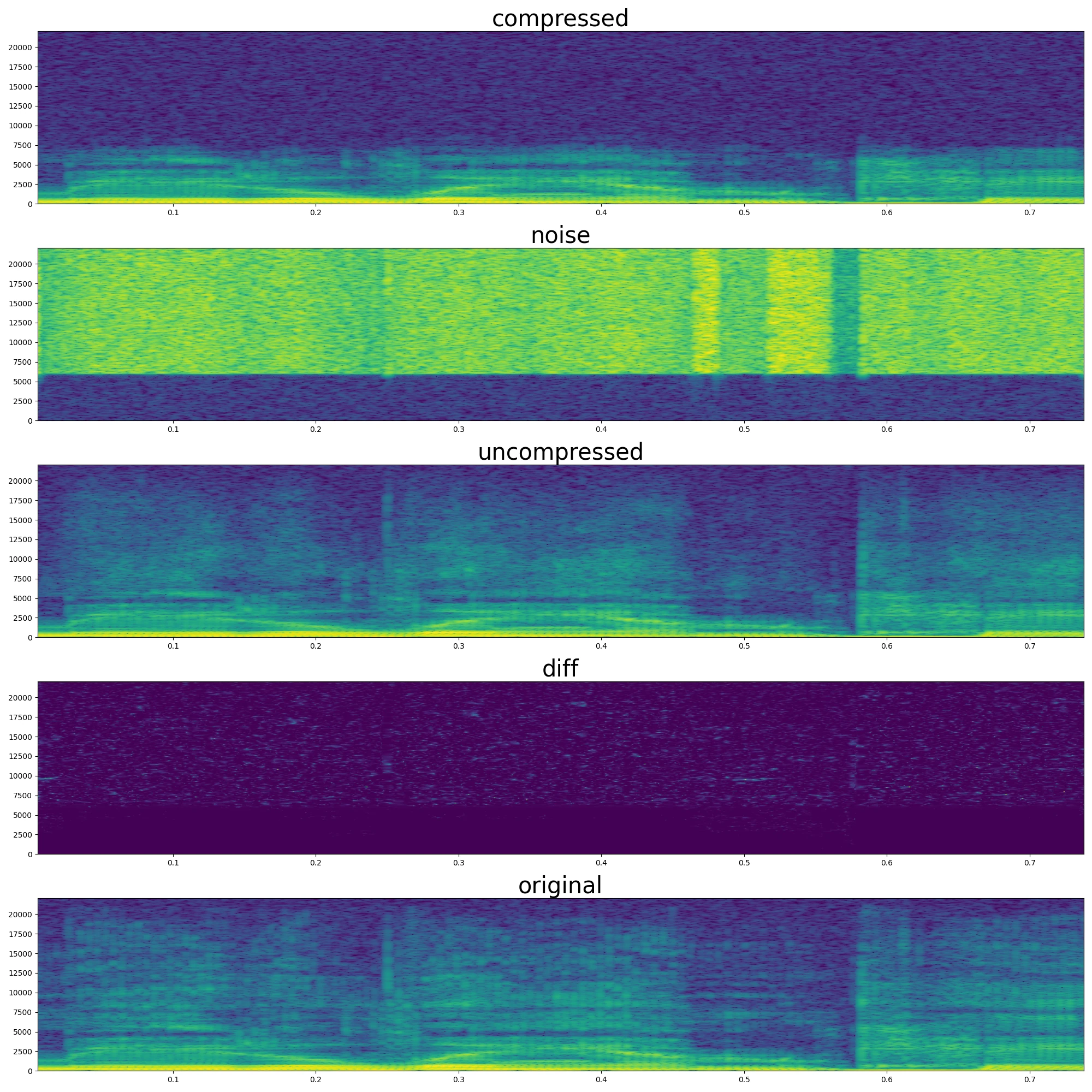
In Figure 5, the energy the reconstruction adds above 6 kHz rises and falls with the original, and some of the original’s horizontal resonance bands appear too, though the fine detail is smoother. The difference panel is dark below 6 kHz because that band comes from the original. These are training segments; the audio examples below come from held-out recordings.
The 0–6 kHz band keeps the pitch and the words (telephone audio keeps even less and is still understandable), but it sounds muffled. In the reconstruction, the muffled quality is gone and consonants get their sharpness back. During training, the model saved a reconstruction of a random held-out recording every 200 iterations, and these four come from the last stretch of training.
| Audio | Example 1 | Example 2 |
|---|---|---|
| Original | ||
| 0–6 kHz band | ||
| Reconstruction |
| Audio | Example 3 | Example 4 |
|---|---|---|
| Original | ||
| 0–6 kHz band | ||
| Reconstruction |
Since we predict tract diameters, we can also watch the tube change shape while the reconstruction plays, as in Figure 6.
We shouldn’t read these shapes as anatomy. Nothing ties them to real articulators, so the network uses whatever shapes reproduce the upper band. Interestingly, during silent moments, the tract keeps jittering. This is probably because in silence, many different shapes give the same quiet output, and the smoothness term only compares neighboring segments, not consecutive moments.
Why This Is Useful
The reader at this point could rightfully ask the question: what is the practical significance of this method? After all, the system starts from a recording, removes its upper band, and rebuilds it.
This post shows a simplified version of a text-to-speech system, published as a conference paper. In the full system, shown in Figure 7, one model predicts the mel spectrogram from text, and an off-the-shelf text-to-speech model generates the 0–6 kHz audio. The tube and its controls stay the same. (The model and examples in this post come from the code linked below, not from the paper’s experiments.)

The point of the design is speed and memory. When this work was done in 2019, neural models that generated high-quality audio directly were expensive. High-quality audio needs 44,100 samples per second. Autoregressive models such as WaveNet generate them one at a time, which is slow and adds latency, while parallel models such as WaveGlow are large and need a lot of memory. Physical models of the vocal folds rarely sound realistic, so the lower band still needs a neural model, but the hybrid system makes every part cheaper:
- The neural model only generates audio up to 6 kHz, which needs a 12 kHz sampling rate, fewer than a third as many samples as 44.1 kHz audio.
- We parallelized the waveguide for training, but at inference, it is basically a ‘while’ loop over about a hundred numbers. Like WaveNet, it produces one sample at a time, but without running a large network for each one, so it runs fast on a CPU, and the audio can be streamed with low latency.
- The tract controls change slowly, like real articulators, so the network only needs to update them every few milliseconds, not at every sample.
A small control network and a simple waveguide need very little memory compared to a large model such as WaveGlow. The deep learning models predict slow controls and a band-limited signal, and a fast physical simulation adds the high-frequency detail that makes audio sound natural.
Acknowledgement
This work was done during my BSc thesis under Csaba Zainkó’s supervision. It was later published as a conference paper coauthored with Csaba Zainkó and Géza Németh.
Citation
Cited as:
Englert, Brunó B., Zainkó, Csaba, and Németh, Géza (2019). WaveTract: A hybrid generative model for speech synthesis. 2019 International Conference on Speech Technology and Human-Computer Dialogue (SpeD), pp. 1–6. doi:10.1109/SPED.2019.8906280.
Or
@inproceedings{englert2019wavetract,
  title     = {{WaveTract}: A hybrid generative model for speech synthesis},
  author    = {Englert, Brunó B. and Zainkó, Csaba and Németh, Géza},
  booktitle = {2019 International Conference on Speech Technology and Human-Computer Dialogue (SpeD)},
  pages     = {1--6},
  year      = {2019},
  doi       = {10.1109/SPED.2019.8906280}
}
Source code
The training code and the waveguide model are available at github.com/englertbruno/wavetract. The parallel waveguide described above is implemented in src/model/tract.py, and main.py trains the model on EARS. The repository tracks the flow of air instead of pressure, which flips a few signs compared with the code in this post.